


Pocket Life World: Avatar Town
4.7143.00 Reviews
App Specs
- Version
- 1.230
- Updated On
- License
- Free
- Downloads
- 5,000,000+
- Developer
- Cub Leopard
- Categories
- Educational
- Platform
- Android
Screenshots



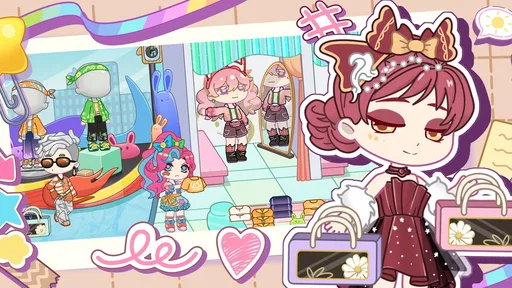

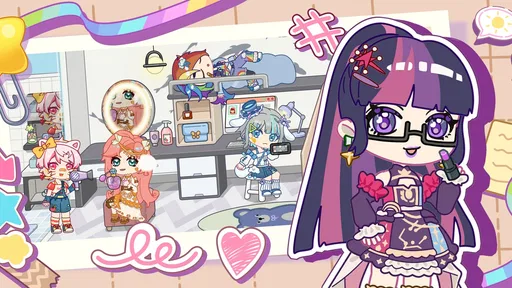
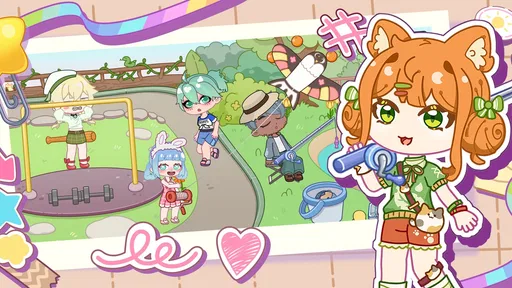
 Analysis by AppCompare
I find the clearest way to judge Pocket Life World: Avatar Town is to focus on its creative core: shaping a little world around characters you make yourself. It’s an educational game from Cub Leopard, but its appeal is less about lessons and more about experimenting with appearance, spaces, and small imagined stories. I would describe it as a digital dollhouse with room to personalize, rather than a town-management challenge built around complicated rules.
What creating an avatar adds to the experience
Making an anime-style avatar gives the rest of the play a personal anchor. Instead of arranging a generic scene, I can think about who belongs in it and what kind of setting would suit them. Choosing a look and then placing that character into a world makes even simple decorating feel like part of a story. That is the capability I’d put first for anyone deciding whether to try the game: it gives creative play a character to revolve around.
The distinction matters if you are choosing between this and a conventional builder. A builder often asks you to optimize space, gather resources, or keep a progression system moving. Here, the more appealing question is what you want your avatar’s surroundings to look and feel like. That makes the game easier to approach in short, relaxed sessions, though players who want demanding goals may find the open-ended style less compelling.
How I’d use the creative tools
I’d treat avatar styling and world decoration as two parts of one project rather than trying to finish everything at once. First, settle on a character concept—perhaps a quiet book lover or a bold performer—then make choices about the environment that reinforce it. Even when the game leaves the story to your imagination, this simple order helps the finished scene feel intentional instead of like a collection of unrelated items.
Another useful approach is to work in small passes. I would make the character’s basic look first, arrange a few elements around them, and then revisit details after seeing the whole composition. That is often more satisfying than making every choice in isolation: an outfit that looks appealing in a customization screen may not suit the mood of the scene you end up building. The freedom to revise your idea is part of the fun, not a sign that you chose badly.
For a realistic everyday use, imagine opening the game during a quiet break and giving yourself one modest creative goal: make a new avatar, or adjust a setting to match a character you already have. That can be a more rewarding stopping point than waiting for a large project to feel complete. If you play with a child, the same approach can turn a session into a gentle prompt for inventing a character and describing the place they might live, while keeping the activity imaginative rather than competitive.
Where it sits among other creative games
Compared with a traditional life simulator, this game’s strongest draw is the act of making a cute character and arranging a personal setting, not managing a detailed schedule or chasing realistic routines. Compared with a pure dress-up game, the world-building element gives the avatar somewhere to belong. That combination makes it a reasonable middle ground for someone who enjoys styling but wants more context than a single outfit screen can provide.
Worth Reading Before You Choose

Flipboard Shows What News Apps Must Do Beyond the Feed

Switching to Android Auto Means Rethinking Your Driving Routine

Google Calendar Makes a Crowded Week Easier to Manage

Ludo King Makes the Most of the Minutes Between Plans

Baby Panda World Brings Quick Play to Modern Phones, but Its Game Library Feels Busy

ESPN’s Live Game View Makes Following Close Games Easier
It is not automatically a better fit than either alternative. If you want a tightly guided campaign, complex building systems, or clear competitive targets, a deeper simulation or strategy game will probably hold your attention longer. If you only want quick outfit changes and do not care about arranging a setting, a focused dress-up title may get you to that activity with less surrounding material. I’d choose this one when the pleasure is in connecting a character’s look with a small world.
Who will get the most from it
I think the best audience is players who like anime-inspired characters, visual customization, and making up their own reasons for a scene to exist. It can also suit someone looking for low-pressure creative play after school or work: there is no need to treat every session as a mission. Parents considering it for younger players may appreciate that its content rating is Everyone, while still keeping an eye on spending because optional in-app purchases are available.
The game is free to download, and its 4.7 average from around 14,000 ratings suggests that many players respond well to its style. It has passed over a million installs, so it is not an obscure experiment, but those figures do not tell me whether its particular creative loop will suit you. I would use them as context, then decide based on whether avatar-making and decorating sound enjoyable in their own right.
Things to consider before settling in
Open-ended creativity comes with a trade-off: it can be relaxing, but it may also leave you responsible for supplying your own goals. If you are the kind of player who likes a clear next step, you may sometimes wonder what to do after finishing a look or arranging a scene. Setting a small personal objective before opening the game helps—design a character around a color, create a setting for a particular mood, or make one change rather than expecting the game to provide a long checklist.
There is also a practical spending consideration. The game is free, but in-app purchases range from $0.99 to $49.99 per item. I would approach those as optional rather than necessary and decide on a budget before browsing purchase options, especially if a younger player uses the device. The useful question is not whether a purchase exists, but whether it adds enough to the particular creative project you care about. A satisfying session should not depend on buying something impulsively.
Device compatibility is straightforward for many Android users: the current version is 1.210 and requires Android 6.0 or later. It was released on April 30, 2025. Those details are helpful if you are checking an older phone before installing. I would also keep expectations centered on what the game clearly does best—personalized characters and a made-up world—rather than assuming that every life-simulation feature found elsewhere will be part of the experience.
One more question worth asking is whether you want to create privately or share the activity with others. The strongest reason to try this title is still the personal design loop: making a character, giving them a setting, and returning to adjust the result. If your enjoyment depends on a particular social feature or a specific kind of collaboration, make sure that feature is actually available to you before building your plans around it. The game is most rewarding when the core creative activity itself is enough.
Unleashing Your Creativity
The first thing that struck me about Pocket Life World: Avatar Town is the sheer level of creativity it allows. You start by creating your own avatars and then dive into building your town. The customization options are endless, from hairstyles and outfits for your avatars to the architectural details of your buildings. Whether you’re a fan of modern design or classic styles, you can tailor everything to your liking.
As someone who loves to tinker with design elements, I found myself spending hours just perfecting my little virtual world. The interface is user-friendly, making it easy to navigate through the plethora of options. It’s like playing with a digital dollhouse, but way cooler.
Gameplay & Mechanics
Once your town is up and running, the real fun begins. You can interact with your avatars, assign them tasks, and watch your town come to life. The game mechanics are smooth, and there’s a satisfying rhythm to running your town. You can expand your town by adding new buildings, which unlocks more activities and interactions.
What really keeps the game engaging is the constant updates. The developers seem to be committed to adding new features and content regularly, which keeps things fresh and exciting. Every update feels like a new chapter in your town’s story, and I’m always eager to see what’s next.
Graphics & Sound
The graphics in Pocket Life World: Avatar Town are vibrant and charming. The art style is whimsical, with a playful palette that makes everything pop. It’s a visual treat, and the animations are smooth and lively. The attention to detail in the avatars and buildings is impressive, and it shows the developers' dedication to creating an immersive experience.
The sound design complements the visuals perfectly. The background music is cheerful and catchy, adding to the overall ambiance of the game. Sound effects are well-placed, enhancing the interactions and activities within the game. Together, they create a joyful atmosphere that’s hard to resist.
Community & Social Features
One of the highlights of Pocket Life World: Avatar Town is its social aspect. You can connect with friends, visit their towns, and even collaborate on projects. The community is active and vibrant, full of players sharing tips, designs, and stories. This social element adds another layer of enjoyment, as you get to see other players’ creativity and get inspired by their towns.
Interacting with other players also means you can trade items and resources, which adds a strategic element to the game. It’s fun to see how different each town can be, reflecting the unique styles and personalities of their creators.
Final Thoughts
Overall, Pocket Life World: Avatar Town is a delightful escape into a world of endless possibilities. It’s perfect for anyone who loves creativity, design, and simulation games. Whether you’re looking to unwind after a long day or dive into an engaging project, this app has something for everyone.
With its charming graphics, engaging gameplay, and vibrant community, it’s easy to see why it’s gaining popularity. If you haven’t tried it yet, I highly recommend giving it a go. Just be warned—it’s incredibly addictive, and you might find yourself spending more time in your virtual town than you initially planned!
Pros
- Rich customization options for avatars.
- Vibrant and detailed game environment.
- Frequent updates with new content.
- Intuitive and user-friendly interface.
- Offline play available.
Cons
- In-app purchases can be costly.
- Some features require premium access.
- Occasional bugs in new updates.
- Limited storyline progression.
- Ads can be intrusive at times.
FAQs for Pocket Life World: Avatar Town
What is Pocket Life World: Avatar Town and what can you do in the game?
Pocket Life World: Avatar Town is a simulation game where players can create and customize their own avatars, build a virtual world, and interact with other players. You can decorate your home, explore different areas of the town, participate in fun events, and complete various tasks to unlock new customization options and items.
Is Pocket Life World: Avatar Town free to play, or are there in-app purchases?
The game is free to download and play, offering a range of basic features at no cost. However, it includes in-app purchases for players who want to enhance their experience with additional items, customization options, and faster progression. These purchases are optional and can be disabled in your device settings if desired.
Can Pocket Life World: Avatar Town be played offline?
Pocket Life World: Avatar Town requires an internet connection to access all its features, including social interactions, updates, and events. While some elements of the game might be accessible offline, the full experience, including community features and event participation, necessitates being online.
What age group is Pocket Life World: Avatar Town suitable for?
The game is designed for a broad audience, typically suitable for ages 12 and up due to its interactive and social nature. It features a user-friendly interface, engaging activities, and a safe, moderated environment that encourages creativity and interaction among players.
How does Pocket Life World: Avatar Town ensure player safety and privacy?
The game implements several safety measures, including content moderation, privacy settings, and reporting tools to protect players. Users can control their own privacy levels and block or report any inappropriate behavior. The developers are committed to maintaining a safe and enjoyable environment for all players.


